loosely woven
Invitation to Local LLMs for Daily Tasks
Note: This blog is something I write in the limited time I have. I wrote it in Japanese (mother's tongue) and had an AI turn it into English, followed by light final touch. That is why it may read a little AI-ish here and there. Do forgive me!

Local LLMs are a lot of fun. So much fun that I have wasted hours on them.
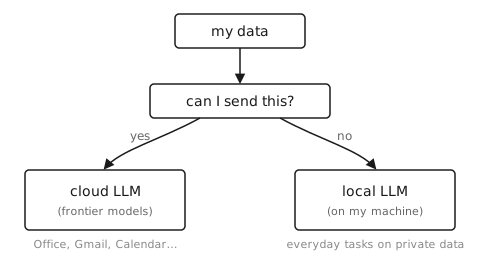
A local LLM can touch data that I cannot let a cloud LLM touch. That means it can automate all sorts of everyday tasks. I am in the middle of automating various things right now. I have learned a lot along the way, so today I want to write about it.
The problem with cloud LLMs
Frontier models are straight-A students that handle almost anything well. The recent ones in particular integrate smoothly with Office, Gmail, and Google Workspace. They are easy to set up and often ready to use right away.
Handing them my data is a separate question, though. At my university, regulations forbid sharing many kinds of data, and I myself am reluctant to hand over personal information. So I split my data into what I send to frontier models and what I do not.
I am not just being paranoid here. Accidents have actually happened. At Samsung, employees pasted confidential source code and meeting notes into ChatGPT, and the company ended up banning generative AI internally. ChatGPT’s link-sharing feature put thousands of conversations into Google search results. Just recently, shared conversations and Artifacts from Anthropic’s Claude showed up in Google search as well. Some of them reportedly contained medical records of real patients and internal-only company documents. DeepSeek went as far as leaving a database of chat histories and API keys wide open on the internet. Once your data is on someone else’s cloud, you no longer control what happens to it.
But once I split my data this way, some tasks can use an LLM and some cannot. And many small daily tasks deal with exactly the kind of data I cannot send to someone’s cloud. So those tasks stay manual and tedious.
So there is plenty to gain from a local LLM.
The problem with local LLMs
Can you use one as-is, then? Not really. A raw local LLM is completely useless. It hallucinates a lot, stalls in the middle of its reasoning, forgets the instructions partway through, and looks at the same file over and over.
The problems come down to roughly three.
First, it can only follow a limited number of instructions. Recent benchmarks report that frontier models can follow around 2,000 instructions at once, while small models fall apart exponentially as the instructions pile up. This matches my experience. A local LLM can reliably keep to a few dozen instructions at most. Beyond that, it loses track of them.
Second, it hallucinates easily. A local LLM has been trained on less data and holds less knowledge inside. So when it strains to produce an answer anyway, it makes things up. Its memory is not great either. After many turns, it forgets what it learned at the start.
Third, it does not deal well with vague instructions. It tries to interpret them and make a plan through its reasoning. But the planning is often sloppy and unstable. The same input can produce completely different plans, and the task fails.
Put these three together and you get a loop. The model forgets the original instruction in the middle of its reasoning, forgets the file it read at the start, and reads the same file again. The reasoning gets longer, and it forgets the instructions even more.
On the other hand, if I can cover for these weaknesses with good design, a whole lot of tasks become possible. This engineering problem is very fun.
Documentation is automation
The principle behind my solution is Thomas A. Limoncelli’s Documentation Is Automation. It explains that automation happens in four stages. It was written as a guide for human engineers, but it is very helpful when you build a system around a local LLM, so let me introduce it here.
- Document: write down the steps
- Find equivalents: replace each step with a command
- Automate: chain the commands together
- Autonomous: let it run unsupervised
Automation cuts down the time spent on repeated tasks. Of course, it takes some time up front. But I think of that as paying off a time debt that would otherwise follow me far into the future.
In my case, the four stages took the shape of command-line tools and skills. My system follows the four stages exactly, so let me walk through them in order.
1. Document: record first, then write it down
To write things down, I first need a record of my daily work. For me, that record is the session with the LLM. If I save the sessions, every concrete step of the work stays there.
On top of that, whenever a piece of work comes up, I make it a habit to first create a task on Forgejo (a GitHub-like thing you can host yourself). This lets me look back later and see what tasks there were. Each task is tied to its session, so if I want the concrete steps, I just go look at the session. Later, I look back over these tasks to find spots that could be automated.
Then, for work that keeps coming back, I write a skill, a short instruction file that tells the model how to do that work smoothly. In other words, my documentation has two layers: Forgejo (the record of tasks and sessions) and skills (the written-down procedures).
2. Find equivalents: turn steps and skills into commands
Next, I replace the documented steps and skills with command-line tools wherever I can.
A local LLM cannot be trusted. If I hand it the whole job, it leaves tasks unfinished or gets stuck in a loop somewhere unexpected. So I automate whatever I can with command-line tools, to lighten the model’s load. Concretely, I have command-line tools that look things up in Gmail, write email drafts, check my calendar for conflicts, access Google Drive, and so on.
This is also the heart of my hallucination fix. If I move the whole procedure of a task into the command-line tool, the model has no room to invent steps. The hallucination has nowhere to start.
One more thing matters here. I design the command-line tools local-LLM-first. I run the model for real, keep a log of failed tool calls, and watch for the mistakes it makes again and again. Then I redesign the tool to fit those mistakes. I fix an argument, or I turn search into lookup, and so on.
For example, the model kept typing mail lookup when the command was mail search. So I renamed the command to lookup and kept search as an alias.
3. Automate: connect them with a meta-skill
Real tasks do not arrive politely one at a time. Some stretch across several tasks. Some new tasks arrive with an existing task tucked inside. So I write what I call a meta-skill. A meta-skill is a skill for using the other skills and commands. It describes the overall flow of the work: which tool or skill to use at which moment.
There is a knack to writing skills. As I said above, a local LLM cannot follow many instructions. So I push most of the work into the command-line tools and keep the skills short.
Ideally, how to use a tool should all be written in the tool’s help text. But then the model has to run a command every time to read it, and that wastes time. So I deliberately write the usage into the skill.
On top of that, skill files written by an LLM are full of needless decoration and wordy instructions. They crowd the model’s working memory. So I write skills in telegram style. This saves quite a lot of tokens.
Here is an example. When an LLM writes a skill, it comes out like this:
If you would like to search for emails from a particular person within the last week, you can use the search subcommand together with the –from option, which accepts an email address or a name. Please note that too many results can crowd the context, so it is recommended to limit the number of results.
In telegram style, the same instruction becomes this:
Search mail from person, last week:
mail search --from <person> --newer-than 7d. Max 5 results.
The token count drops to about a fifth.
I also keep skills in line with a project-wide policy. Once you start writing skills that stray from the policy, you end up scratching your head, and maintenance becomes a pain.
4. Autonomous: let it run unsupervised
With all of this in place, the LLM can finally do whole tasks without me. When I hand it a Forgejo task, it follows the flow in the meta-skill, calls the command-line tools, and runs to the end.
The important part of running unsupervised is the safety net. I first decide which parts to automate and which parts not to. Then I put only the allowed operations into the command-line tools and deliberately leave the rest out. For example, the mail tool has no send function, so the local LLM cannot send an email by mistake. The calendar tool has no invitation function either, so it cannot invite people to meetings.
My boundary line is whether the work can be redone. If the work can be redone, I automate it. If it cannot, I do not. Drawing the line inside the tools is far more reliable than pleading “never send” in a prompt. In fact, the LLM has never once crossed that line.
Optional: do not let the model use grep
This one is optional, but it helped a lot. I do not let the model use grep to search my wiki. grep is a search command that LLMs love. But grep spits out a huge amount of text, the context fills up right away, and the model’s performance falls off a cliff. To avoid this, I use a command called rtk and I built a vector database of my own, and I make the model pull information from there. For details, this blog covers rtk well, and this article covers vector databases.
In closing
All sorts of local LLMs are available now, and new models and checkpoints keep coming. The better local LLMs get, the more tasks I can hand over. I am very much looking forward to what comes next.