Context Engineering
This module introduces context engineering, the discipline of managing an LLM’s working memory.
You’ll learn:
- What context decay means and how it degrades model performance as token count grows.
- The four strategies: write (scratchpads, rules files), select (progressive disclosure, MCP), compress (summarization, trimming), and isolate (multi-agent architectures).
- How to set up Model Context Protocol (MCP) servers like Context7 for on-demand documentation retrieval.
- Practical techniques to prevent context rot and optimize your agent’s attention budget.
The Problem: Context Decay
LLMs are brilliant but bounded. Every model has a context window, the set of tokens available during inference. Think of it as working memory.
An LLM has an attention budget that degrades as context grows. As token count increases, the model’s ability to accurately use that context degrades. This phenomenon is called context rot.
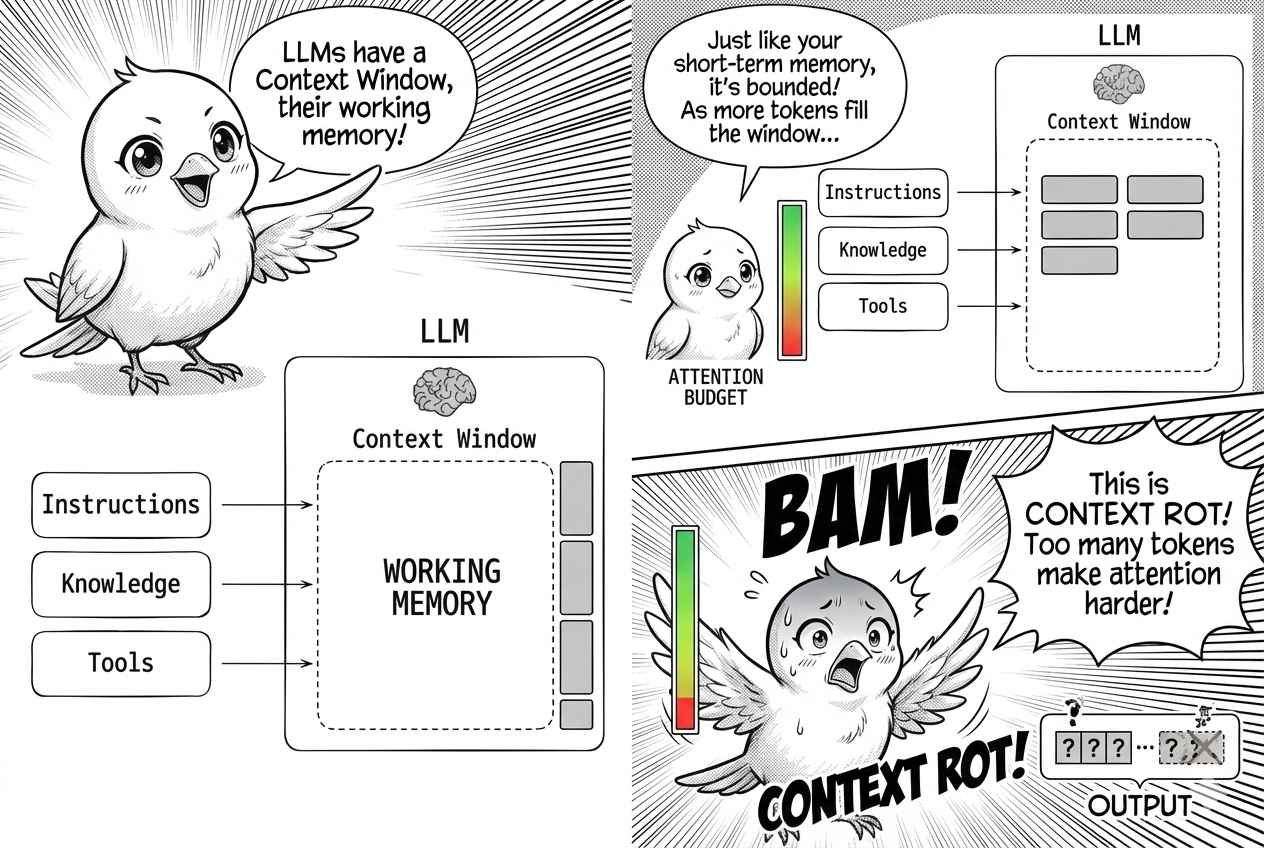
Why does this happen? The root cause is architectural. LLMs use the transformer architecture where every token attends to every other token. For n tokens, this creates n^2 pairwise relationships.
As context length increases, attention gets stretched thin across these relationships. Models are trained predominantly on shorter sequences, so they have less specialized capacity for long-range dependencies. Position encoding tricks help, but performance still decays.
This decay manifests in four failure modes. Context poisoning occurs when a hallucination or error enters the context and influences future outputs. Context distraction happens when the volume of context overwhelms the model’s training distribution, causing it to lose focus.
Context confusion arises when superfluous information nudges the model toward irrelevant responses. Context clash occurs when parts of the context contradict each other, forcing the model to arbitrate between conflicting signals.
What’s the solution? The naive view treats context engineering as simply writing a better prompt. The reality is much broader.
Context engineering is the discipline of managing the entire context lifecycle: what tokens go in, what stays, what gets compressed, and what gets isolated elsewhere. Think of it this way: the LLM is like a CPU, the context window is like RAM, and context engineering is the operating system that curates what fits.
The Four Strategies
Context engineering breaks into four strategies: write, select, compress, and isolate. Each addresses a different phase of the context lifecycle. Let’s walk through them in modern agentic AI tools.
Writing Context
Let’s talk about the first strategy: writing. Agents use scratchpads to offload working memory. Instead of keeping every intermediate step in the context window, an agent writes state like a todo list or summary to an external file or variable.
Tools like Claude Code, Gemini CLI, Antigravity, and Cursor use this pattern to track multi-step tasks across context resets. They maintain coherence without bloating the prompt.
What about long-term memory? Agents rely on persistent rules files like AGENTS.md, CLAUDE.md, or .cursorrules. These act as procedural memory, storing project-specific instructions that are injected into the context at the start of a session or retrieved when relevant.
Here is a sample AGENTS.md file:
## Project: `AgenticFlow` - Context Engineering Demo

###  Project Goal
Demonstrate advanced context engineering for LLM agents: writing, selecting, compressing, isolating context to optimize performance and ensure robust multi-step workflows.

### Agent Persona & Principles
-   **Role**: Senior AI Engineer/Architect.
-   **Objective**: Develop efficient, reliable, maintainable agentic workflows.
-   **Style**: Clear, concise, technical, solution-oriented. Justify decisions.
-   **Principles**: Context Efficiency, Modularity, Transparency, Robustness, Iteration.

### Technical Guidelines
-   **Language**: Python 3.9+.
-   **Libraries**: `pydantic`, `pytest`, `black`. `langchain`/`llamaindex` for orchestration (use sparingly).
-   **Dev Practices**: Git (conventional commits), Markdown/docstring documentation, comprehensive error handling, explicit tool use.

...(continue)
The AGENTS.md file is an industry standard for agentic AI workflows. It serves as the agent’s procedural memory, storing project-specific instructions, guidelines, and foundational context. This content is automatically injected into the context window at the start of a session or retrieved on demand.
The result is consistent behavior, reduced redundant prompting, and coherence across complex, multi-step workflows. Create an AGENTS.md when you start any new project.
Selecting Context
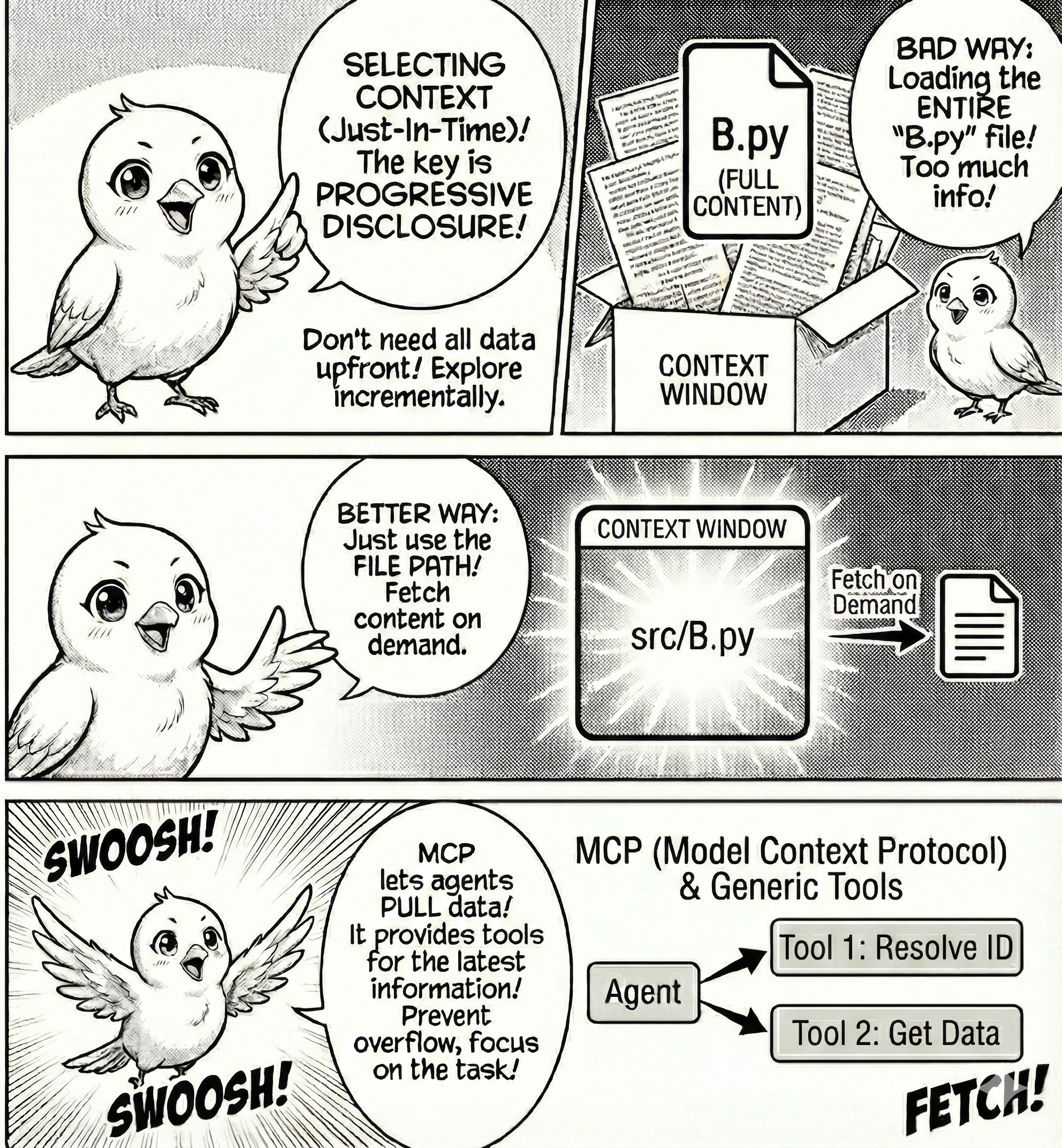
Now shift your attention to the second strategy: selecting. Selecting context means pulling it into the context window at runtime. The key insight is progressive disclosure: the agent does not need all the data upfront.
It explores incrementally, using lightweight identifiers like file paths, URLs, or database queries to fetch data only when needed.
Imagine you want to update a file A.py that depends on B.py. A bad approach loads the entire content of B.py into the context window.
What’s a better approach? Give the agent the file path and let it fetch content on demand.
The Model Context Protocol (MCP) is the standard mechanism for this. Instead of copy-pasting data into the prompt, MCP gives the agent tools to pull data on demand.
Context7 is a good example. It is an MCP server that fetches documentation for a library to ground agents on the latest features. An agent trained in 2024 may not know about 2025 features, but context7 solves this.
It offers two tools: resolve-library-id and get-library-docs. These tool names are injected into the context window. When the agent calls them, it retrieves documentation on demand without polluting the context window, allowing the agent to focus on the task.
Installing Context7 in Google Antigravity
Google Antigravity connects to external MCP servers through a configuration file. The server exposes tools that the agent calls on demand. Let’s wire Context7 into Antigravity so the agent can fetch up-to-date library docs without polluting the context window.
How do you set this up? First, open Google Antigravity and navigate to the MCP Store. Click Manage MCP Servers at the top, then click View raw config in the main tab. This opens mcp_config.json, which controls all external tools available to your agent.


Add this block to your mcp_config.json:
{
  "mcpServers": {
    "context7": {
      "url": "https://mcp.context7.com/mcp",
      "headers": {
        "CONTEXT7_API_KEY": "YOUR_API_KEY_HERE"
      }
    }
  }
}
The API key is optional but recommended for higher rate limits. Get one at context7.com/dashboard. Without it, you have access to the free tier.
Save the config and refresh the MCP servers panel in Antigravity. What should you see? Two new tools should appear: resolve-library-id to map a library name to its identifier, and get-library-docs to fetch documentation for a resolved library ID.
Now prompt the agent with:
Use context7 to get the latest documentation for pandas 2.0 DataFrame.plot() method.What happens behind the scenes? The agent calls resolve-library-id with “pandas” to get the library ID. Then it calls get-library-docs with that ID and your query to retrieve current API docs.
Finally, it uses those docs to generate accurate code. The documentation never enters your prompt. The agent retrieves it on demand, uses it, and discards it. Your context window remains clean.
Compressing Context
The third strategy is compressing. Long-running tasks generate more context than the window can hold. When you approach the limit, you have two choices: summarize or trim.
Compaction through summarization distills a conversation into its essential elements. Claude Code does this automatically. When you exceed 95% of the context window, it triggers auto-compact: the message history is passed to the model to summarize architectural decisions, unresolved bugs, and implementation details while discarding redundant tool outputs.
The agent continues with the compressed context plus the five most recently accessed files.
What’s the art of compaction? Deciding what to keep versus discard. Overly aggressive compaction loses subtle details whose importance only becomes apparent later. Start by maximizing recall, capturing everything relevant, then iterate to improve precision by eliminating fluff.
A lighter form of compaction is tool result clearing. Once a tool has been called and its result used, the raw output can be removed from the message history. The decision or action taken from that result matters. The ten thousand tokens of JSON it returned does not.
Trimming is a simpler strategy. It uses heuristics to prune context without LLM involvement. Remove messages older than N turns, or keep only the system prompt and the last K user-agent exchanges.
This approach requires no model computation but loses more information than summarization.
Isolating Context
The fourth strategy is isolating. Isolation means splitting context across boundaries so the model doesn’t drown in a single monolithic window.
The most common pattern is multi-agent architectures. Instead of one agent maintaining state across an entire project, specialized sub-agents handle focused sub-tasks with clean context windows.
Anthropic’s multi-agent researcher demonstrates this well. A lead agent coordinates with a high-level plan and spawns sub-agents that explore different aspects of a question in parallel, each with its own context window. A sub-agent might use ten thousand or more tokens to explore a research thread, but it returns only a one thousand to two thousand token summary to the lead agent.
The detailed search context remains isolated. The lead agent synthesizes the compressed results without ever seeing the full exploration.
This approach achieves separation of concerns. Each sub-agent has a narrow scope, reducing context confusion and clash.
What’s the cost? Coordination complexity. Spawning agents, managing handoffs, and aggregating results all add overhead. Anthropic reports that multi-agent systems can use up to fifteen times more tokens than single-agent systems. The performance gain on complex tasks justifies it.
The Takeaway
Context is a finite resource. The bottleneck in agentic systems is rarely the model’s reasoning. It is the poverty or pollution of its inputs.
Context engineering is the discipline of managing this resource across its lifecycle. Write what you need to remember. Select what you need now. Compress what you need later. Isolate what you don’t need yet.
The most powerful agent is not the one with the highest IQ in parameters. It is the one with the most disciplined context management.