Hands-on
This module introduces practical agentic coding through hands-on exercises.
You’ll learn:
- How to set up and configure Google Antigravity as an agentic IDE.
- The Mission Control Loop for directing autonomous agents effectively.
- How to build a game by writing only English prompts, not code.
- The art of reviewing agent plans to ensure quality outcomes.
- Why code review has become your primary skill in agentic development.
Setup: Google Antigravity

What is Google Antigravity?
Google Antigravity is not an upgraded text editor. It’s an agent orchestration platform that happens to include a code editor. Where traditional IDEs treat AI as autocomplete on steroids, Antigravity inverts the relationship.
You describe tasks. Agents plan, execute, and verify them across your editor, terminal, and browser simultaneously. The interface splits into two distinct workspaces: the Editor (a familiar VS Code fork for hands-on coding) and the Manager Surface (a control panel where you spawn and monitor autonomous agents working asynchronously).
This architectural shift moves you from code-writer to task-dispatcher. Have you ever wished you could just tell the computer what to do instead of writing every detail? That’s exactly what Antigravity enables.
Getting Started
Download from antigravity.google/download. Available for macOS, Windows, and Linux at no cost during public preview. Log in using your Google Cloud credentials.
The platform provides generous rate limits on Gemini 3 Pro and supports Anthropic Claude Sonnet 4.5 and OpenAI GPT-4o. Model choice is yours. The architecture is model-agnostic.
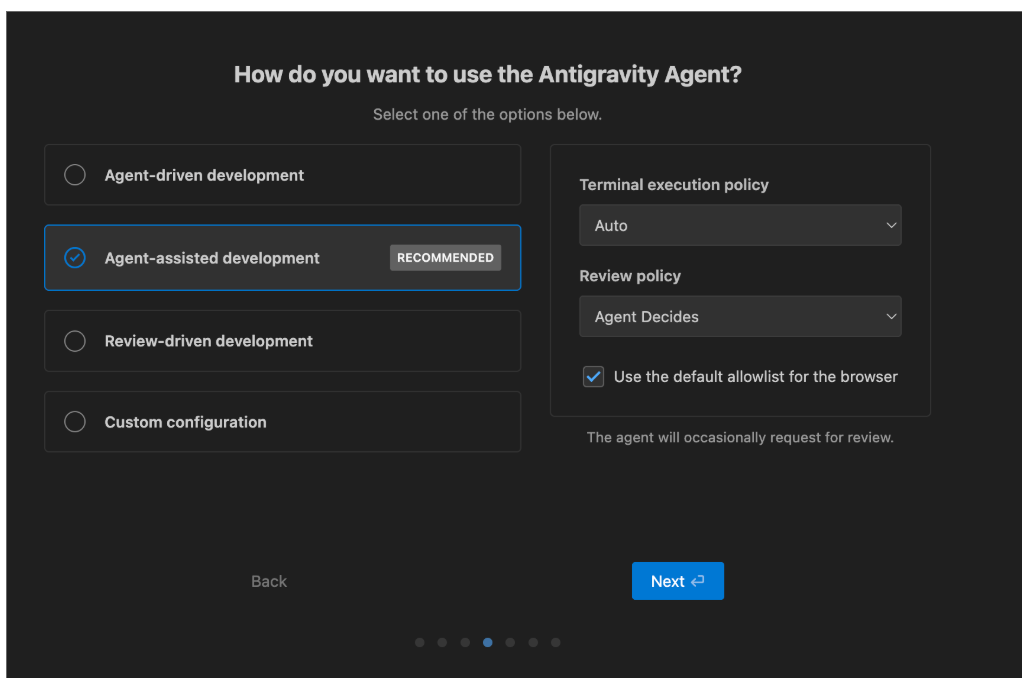
Setting Your Autonomy Level
Before beginning, set your Autonomy Level. This defines how much human review you require.
Review-Driven means agents propose plans and wait for your approval before execution. You remain in the loop for critical decisions. Use this when learning the system or working on high-stakes code.
Agent-Assisted means agents execute autonomously but surface artifacts (screenshots, browser recordings, test results) for verification. You validate outcomes, not steps. Use this for maintenance tasks and bug fixes.
Think of it this way. This setting determines whether you operate as a foreman reviewing blueprints or a manager reviewing deliverables. Start with Review-Driven until you trust the agent’s planning capabilities.
The Mission Control Loop
How do you actually work with an agentic IDE? You must master the Mission Control Loop. This is different from the “Edit-Run-Debug” loop you are used to.
Let’s walk through the five steps.
Define. You state the goal in natural language. Be specific about what you want, not how to build it.
Plan. The agent proposes a strategy. This is the most critical step. If the plan is flawed, the code will be flawed.
Approve. You validate the strategy. Does it make sense? Does it cover edge cases? Does it align with your architecture?
Execute. The agent implements the code. This happens automatically once you approve the plan.
Verify. You test the outcome. Does it work? Does it meet requirements?
Think of yourself as an architect reviewing blueprints before construction begins. The planning phase is where you prevent problems, not during implementation.
Exercise 1: Build Space Invaders Game

Let’s build a Space Invaders game in Python using pygame. You won’t write a single line of Python code. You’ll only write English.
Step 1: Write the Prompt
Open the Agent Manager (Cmd+K) and type:
“Create a robust Space Invaders game using pygame. It should have a scoring system, a ‘Game Over’ screen with a restart button, and use a dark, modern color palette. Ensure the code is modular. Use uv to manage dependencies.”
Notice how the prompt specifies the what, not the how. You describe the outcome you want, and the agent figures out the implementation.
Step 2: Review the Plan
The agent will generate a Plan Artifact. This is where you become the architect. Read through the plan carefully.
Does it mention installing pygame? Does it separate the game logic from the UI? Does it use uv to manage dependencies?
If everything looks good, click Approve. If something feels off, reject the plan and ask for revisions.
Step 3: Watch and Verify
The agent will create snake_game.py and requirements.txt. It will likely run pip install -r requirements.txt automatically. Once finished, run the game.
What happens? Does it work perfectly? Does it crash? If it crashes, do not fix the code. Instead, proceed to Exercise 2 to learn how agents debug themselves.
Exercise 2: The “Fix It” Loop
Why are agents excellent debuggers? They can read stack traces faster than you can. They never get frustrated by cryptic error messages. Let’s see this in action.
Step 1: Break Something
Open snake_game.py and delete a critical import. For example, remove the line import random. Save the file.
Step 2: Watch It Crash
Run the game. It will crash in the terminal with an error message. This is intentional.
Step 3: Send the Error to the Agent
Highlight the error in the terminal and press Cmd+L (Send to Agent). Then type:
“Fix this.”
That’s it. Two words.
Step 4: Watch the Agent Work
What happens next? The agent will read the error (NameError: name 'random' is not defined). It will search the file for usages of random. It will re-add the import. It will run the game to verify the fix.
Notice the pattern. You don’t explain what went wrong. You don’t write the fix. You simply point to the problem and let the agent solve it.
The Takeaway
What have you learned from these exercises? The agent is a tireless worker, but it lacks your intuition. It can write code faster than you, but it cannot judge whether the code is elegant, maintainable, or architecturally sound.
Your new primary skill is Code Review. You are no longer a code writer. You are an architect, a reviewer, a quality gatekeeper.
Trust, but verify. If you blindly approve every plan, you will build a mess faster than ever before. The agent accelerates both good decisions and bad ones. Your job is to ensure the decisions are good.